

TheCheapest & Easiest Wayto Ship Orders Directly From Your WooCommerce Store
Book, label and track shipments easily without leaving your WooCommerce Admin
Shipping prices from £2.20 exc VAT
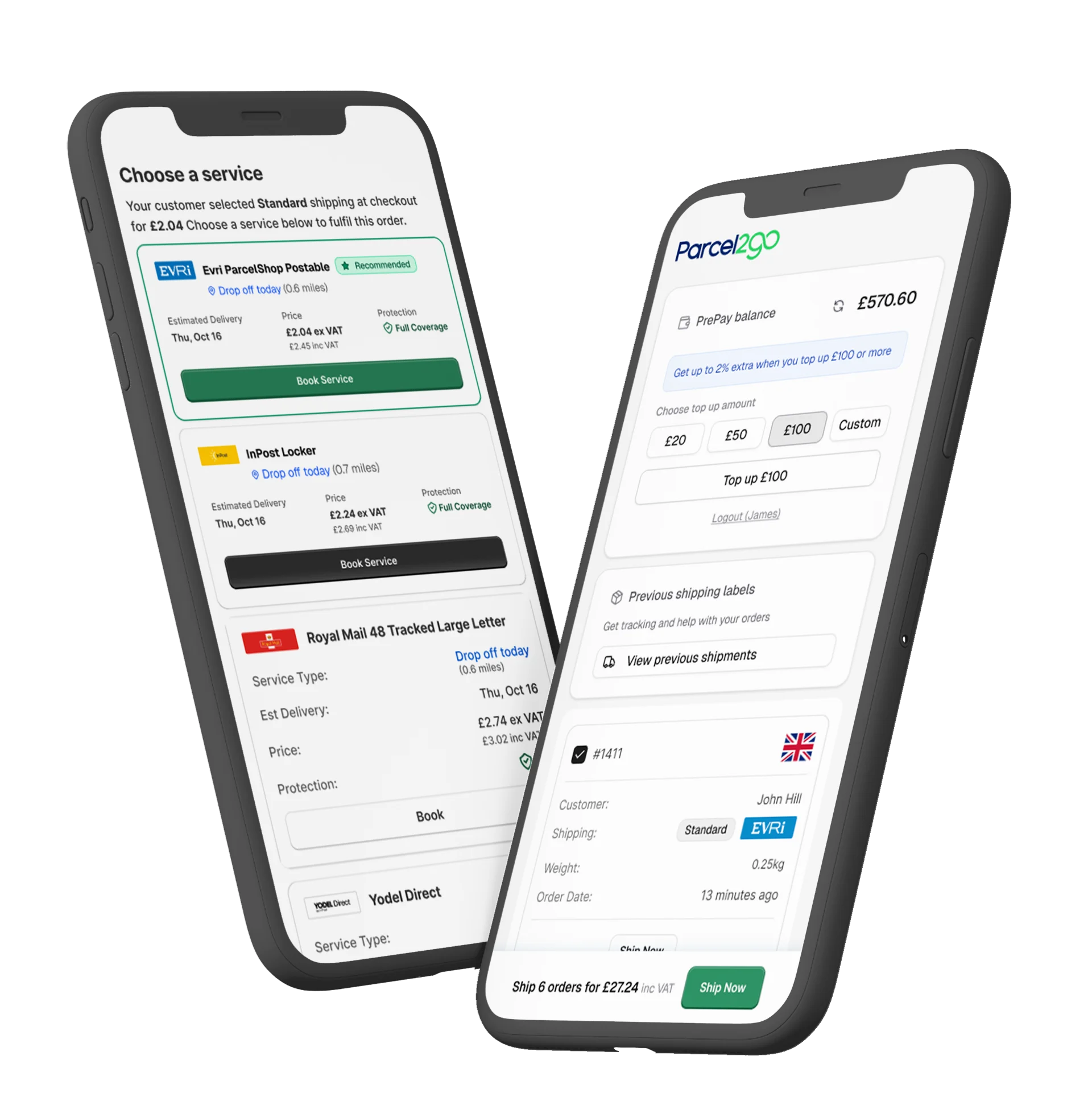
Book, Label and Track Every WooCommerce Order - Without Leaving Your Store
The Parcel2Go Shipping plugin lives inside your WooCommerce admin. From the moment a WooCommerce order comes in, you can compare courier quotes, book a shipment, and download a label without opening another tab!
Connect your store and start shipping reliably with Royal Mail, InPost, Evri, UPS, FedEx and more. Every booking syncs back to your WooCommerce order automatically, keeping your records clean and your customers informed.
Exclusive Rates on Top UK Couriers
Linking your Parcel2Go account inside the plugin unlocks negotiated rates you won't find on the standard booking flow - from £2.20 exc VAT. Compare prices across top couriers for domestic and international delivery. Start saving on every order and pick the best value for size, speed and destination.
Courier | Popular Delivery Service | Price From (exc VAT) |
|---|---|---|
 | InPost Lockers to Home | £2.20 |
 | Yodel Direct | £2.25 |
 | Evri Parcelshop | £2.30 |
 | Royal Mail 48 Tracked Large Letter | £2.29 |
| Royal Mail 48 Tracked Small | £2.94 |
 | FedEx Priority Drop Off | £3.71 |
 | DHL eCommerce UK - Drop Off | £4.69 |
 | DPD Drop Off | £6.72 |
 | Parcelforce Worldwide Express 48 Drop Off | £9.04 |
What Does the Parcel2Go WooCommerce Shipping Plugin Do?
The plugin adds a native shipping panel directly into your WooCommerce admin. When you open any WooCommerce order, the Parcel2Go Shipping plugin lets you get quotes, choose a courier, pay, and print a label - all in one screen.
It is designed for merchants who want to ship from inside WooCommerce itself. If you manage high order volumes across multiple platforms, our Smart Send integration may better suit your workflow - but for WooCommerce-first sellers, the plugin keeps everything in one place.
Why Use a Dedicated WooCommerce Shipping Plugin?
Switching between your store and a separate courier booking platform adds friction and admin time - our plugin removes that entirely:
Quote and book from within the order screen
Courier and tracking details written back to the WooCommerce order automatically
HPOS (High-Performance Order Storage) compatible - built for modern WordPress
Supports all WooCommerce dimension units
International orders supported with customs fields

Ship Without Leaving WooCommerce
Quote, book and label every order from the WooCommerce order screen - no extra tools required.
Track Every Order
Courier and tracking details sync back to WooCommerce automatically so your records are always up to date.
Exclusive Plugin Rates
Link your Parcel2Go account inside the plugin to unlock better rates not available on the standard booking flow.
Built to Help WooCommerce Merchants Ship Faster
The Parcel2Go Shipping plugin is designed for sellers who run their business through WooCommerce and want shipping to be as frictionless as possible:
Compare prices across 20+ couriers on every order, instantly.
Bulk ship multiple WooCommerce orders in a single operation.
Download A4 or 4x6 labels directly from the order complete screen.
Prepay for shipments and top up your account balance any time.
International customs fields built in - ship globally without extra plugins.
24/7 chat support from Parcel2Go shipping specialists.
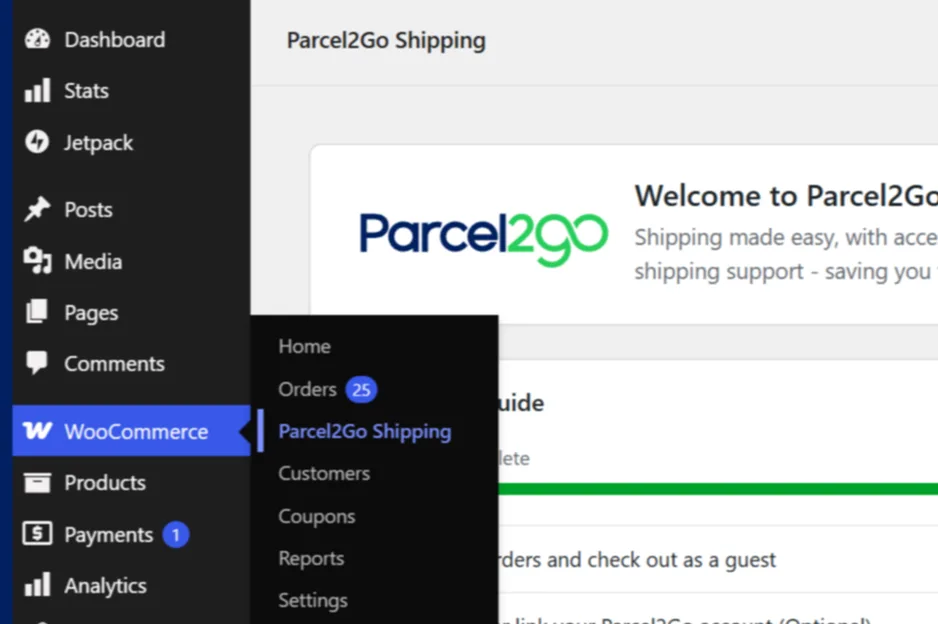
How to Install the Parcel2Go Shipping Plugin for WooCommerce via WordPress
The plugin installs like any standard WordPress plugin and takes minutes to set up.
Go to Plugins → Add New → Upload Plugin and upload the zip, or search for 'Parcel2Go Shipping' in the WordPress.org plugin directory.
Activate Parcel2Go Shipping and follow the onboarding screen.
Go to WooCommerce → Settings to link your Parcel2Go account and set shipping preferences.
Open any order and use WooCommerce → Parcel2Go Shipping to compare quotes and book your first shipment.
Selling Across Multiple Platforms? Smart Send Might Suit You Better!
The plugin is built for merchants shipping from WooCommerce directly. If you also sell on eBay, Amazon, Etsy or other marketplaces and want to manage all your orders in one place. Smart Send imports orders from all your channels automatically. Both are free - pick the one that best suits your needs!
Learn MoreFrequently Asked Questions
How do I install the Parcel2Go Shipping plugin in WooCommerce?
The easiest option is to search 'Parcel2Go Shipping' in the WordPress.org directory. Activate it and follow the onboarding screen - the whole process takes under five minutes.
You can also go to Plugins → Add New → Upload Plugin in your WordPress dashboard and upload the Parcel2Go Shipping zip file.
Does the plugin work with HPOS (High-Performance Order Storage)?
Yes. The Parcel2Go Shipping plugin is fully compatible with WooCommerce HPOS, introduced in WooCommerce 7.1. It has been tested up to WordPress 7.0 and is actively maintained to keep pace with WooCommerce releases.
Can I print shipping labels directly from WooCommerce?
Yes. Once a shipment is booked, you can download A4 or 4x6 labels directly from the WooCommerce order complete screen, or from the Previous Shipments tab. Labels are cached server-side so repeat downloads are instant.
Can I ship multiple WooCommerce orders at once?
Yes. The bulk shipping feature (available from v2.1.0) lets you select and ship multiple WooCommerce orders in a single operation via WooCommerce → Parcel2Go Shipping.
What's the difference between this plugin and Smart Send?
The plugin is built for merchants who ship exclusively through WooCommerce and want to manage everything inside their WordPress dashboard.
Smart Send is Parcel2Go's multi-channel order management platform - ideal if you also sell on eBay, Amazon or other marketplaces. Both are free to use.
Does it support international shipping from WooCommerce?
Yes. The plugin includes customs fields (tariff code and country of manufacture) on product pages for international orders. Couriers that support international delivery are available to compare and book from within WooCommerce.